Product

The full trading cycle, RFQ to PO, without leaving Outlook.

aersyn.ai runs the full buy-and-sell cycle, from the first RFQ to the final PO, right inside the Outlook your traders already live in. AI drafts, your trader approves.

The morning after aersyn.ai is live

Same desk, same volume, same clients. What changes is where the hours go.

Today

  • RFQs pile up in a shared inbox, and the ones nobody opens in time quietly die.
  • Your best trader spends six hours a day copy-pasting quotes out of scanned PDFs.
  • A quote sent Monday gets no follow-up, and the deal is cold by Friday.
  • Two traders answer the same client, and nobody notices until the client does.

With aersyn.ai

  • Every RFQ is triaged, with a reply already drafted, stock and client tier applied.
  • Your trader opens a finished draft, checks it, and hits send in seconds.
  • Follow-ups run on their own, so no live deal goes quiet.
  • A duplicate quote to the same client is caught before it leaves the building.
In StockNeed SourcingQuote SentOrder Received

The cycle, end to end

Nine steps, one desk, nothing dropped between them

Follow one RFQ from the second it arrives to the PO that closes it. Every step happens inside Outlook, and your trader stays in control of what goes out. We call it Augmented Trading.

Step 1 of 9

Every RFQ lands in one triaged queue

Every request is captured and triaged the moment it arrives. None dies in a shared inbox while the sender waits on a quote you never saw.

Excel, Google Sheets, and OneDrive are stock data sources, not email intake. RFQ intake is Outlook and Microsoft 365 only.
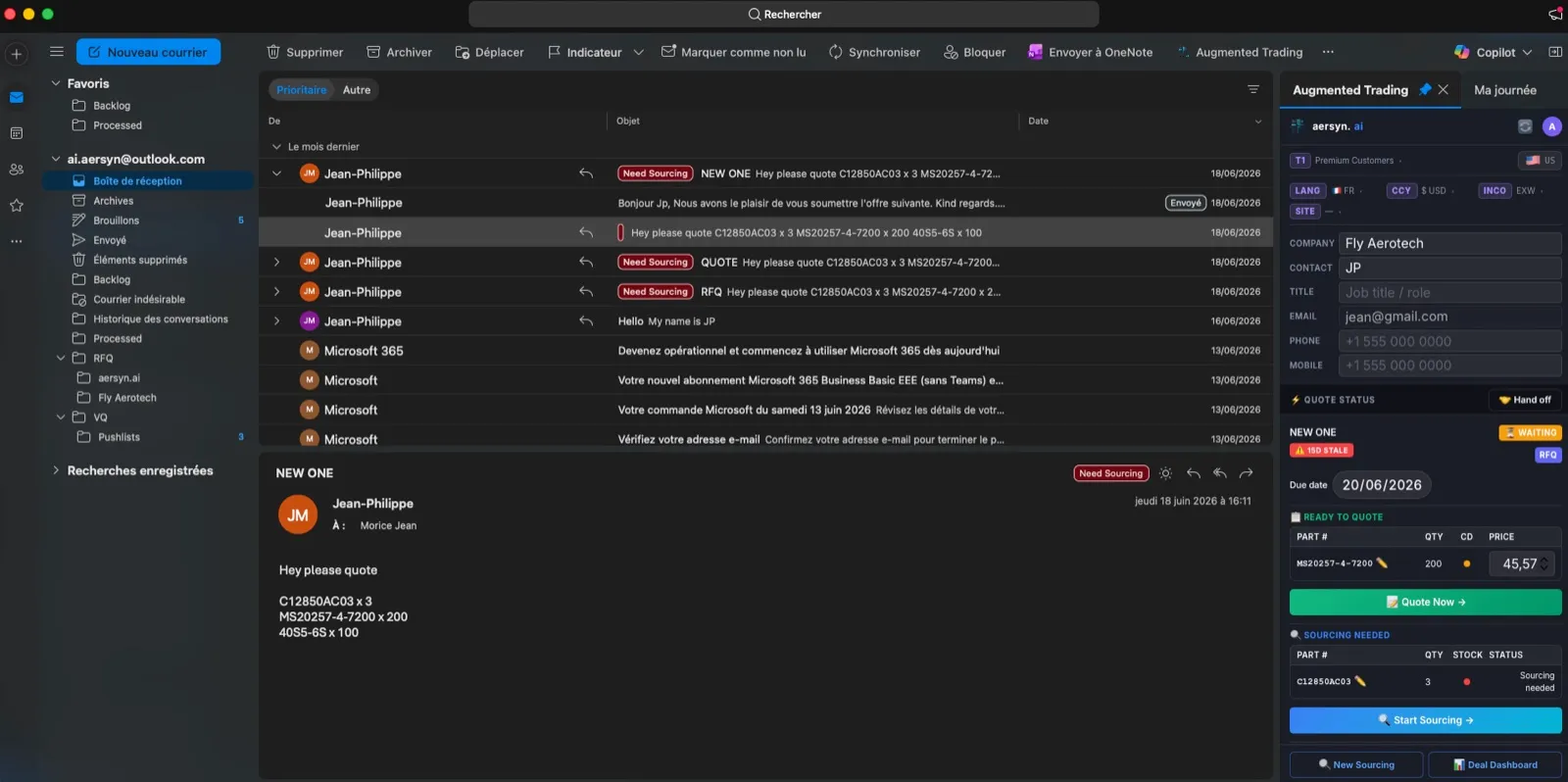
The aersyn.ai pane open next to the Outlook inbox: an inbound RFQ asking for C12850AC03 x 3, MS20257-4-7200 x 200 and 40S5-6S x 100, parsed and filed with the rest of the RFQ mail.

Step 2 of 9

It reads the format the RFQ actually came in

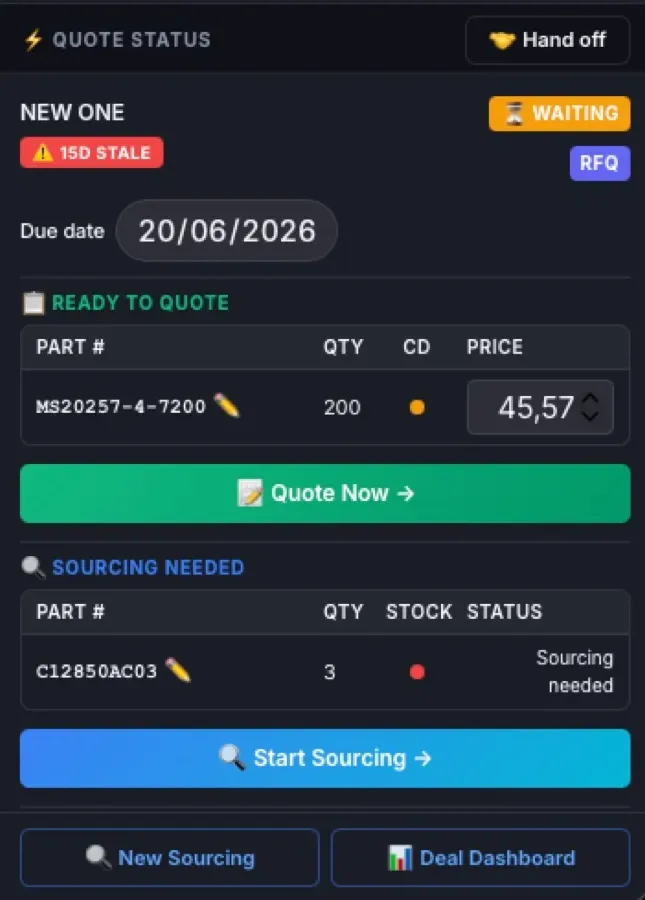
However the RFQ arrives in your Outlook, an email thread, a scanned PDF, an Excel attachment, an ILS or PartsBase export, aersyn.ai reads it and normalizes the line items, part-number aliases included.

The add-in pane after parsing, from the quote status down: MS20257-4-7200, quantity 200, ready to quote at $45.57, and C12850AC03, quantity 3, flagged as sourcing needed because nothing is on the shelf.

Step 3 of 9

Priced against your stock and your client tiers

aersyn.ai checks the request against your stock and applies the pricing rules for that client tier, T1 to T4, before a single number reaches your trader.

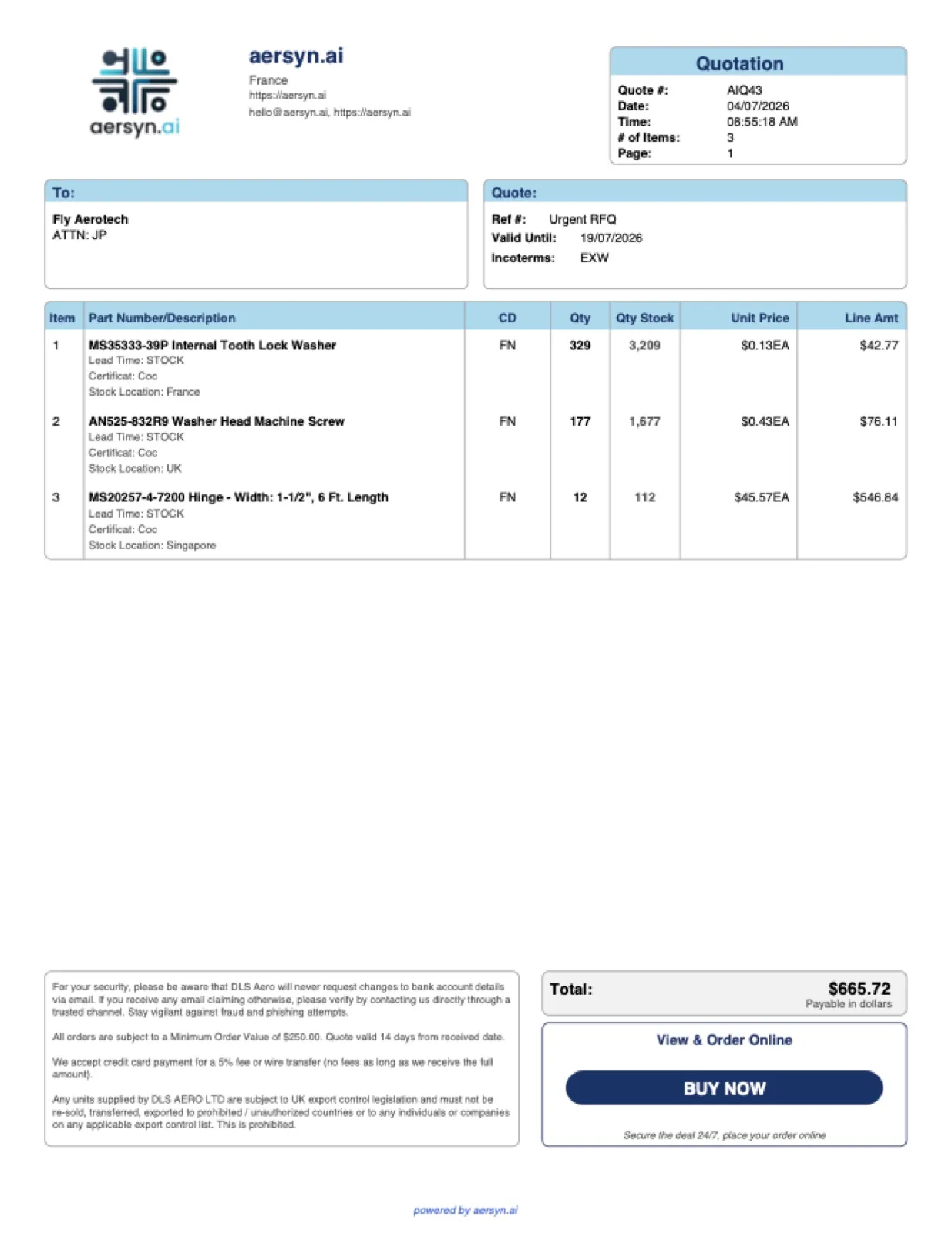
Quotation AIQ43, three lines priced from live stock: MS35333-39P washer at $0.13 with 3,209 in stock, AN525-832R9 screw at $0.43, and MS20257-4-7200 hinge at $45.57, total $665.72.

Step 4 of 9

The quote goes out finished, in the client's own format

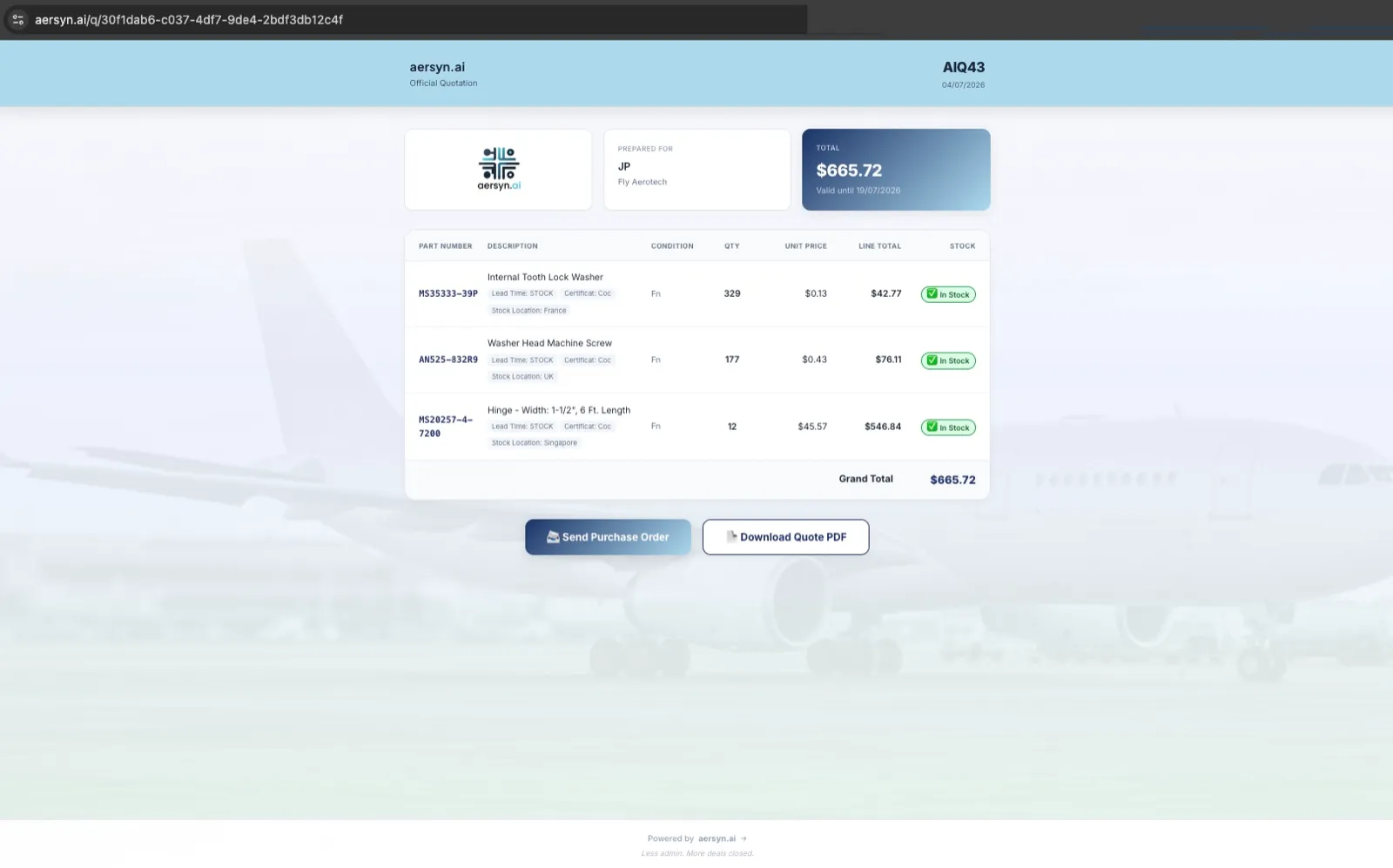
The outbound quote, the paperwork, and a Quote Portal link are prepared automatically, including the Excel laid out in the client's own template. The Quote Portal is a white-label page where your client reviews the quote and replies, under your name, not ours.

Excel, Google Sheets, OneDrive, or a tailored connector to your ERP: we build and maintain it.

The white-label Quote Portal: quotation AIQ43 for $665.72, every line shown in stock with its location, with Send Purchase Order and Download Quote PDF buttons for the client.

Step 5 of 9

Sourcing, and you always choose who to contact

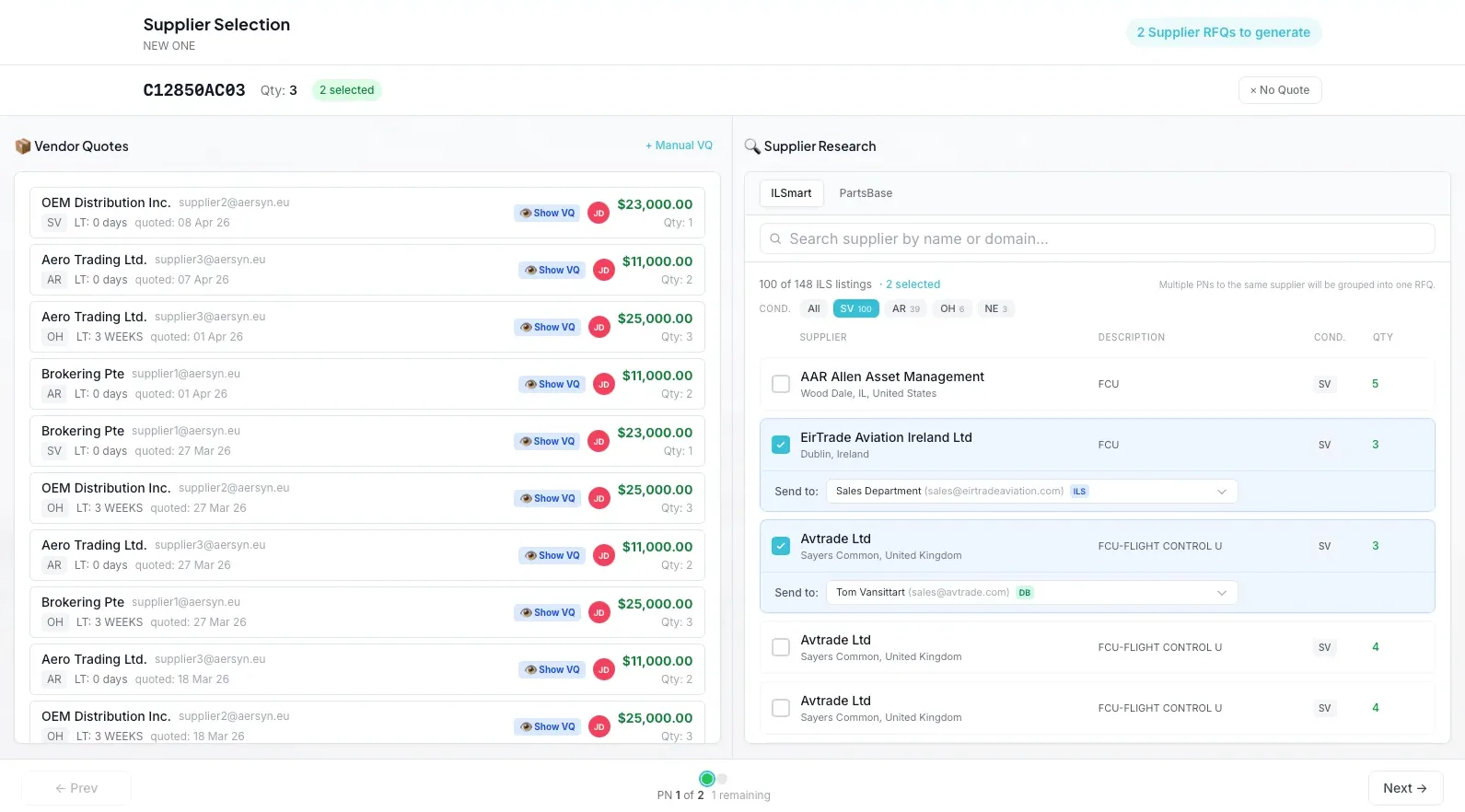
When you need to source, aersyn.ai lines up the vendors and drafts the outreach, but you always choose who to contact. aersyn.ai never contacts a supplier behind your back.

The Supplier Selection wizard for C12850AC03: the vendor quotes already received on the left, live ILS supplier research on the right with EirTrade Aviation and Avtrade selected, and two supplier RFQs ready to generate.

Step 6 of 9

Vendor replies match themselves back to the deal

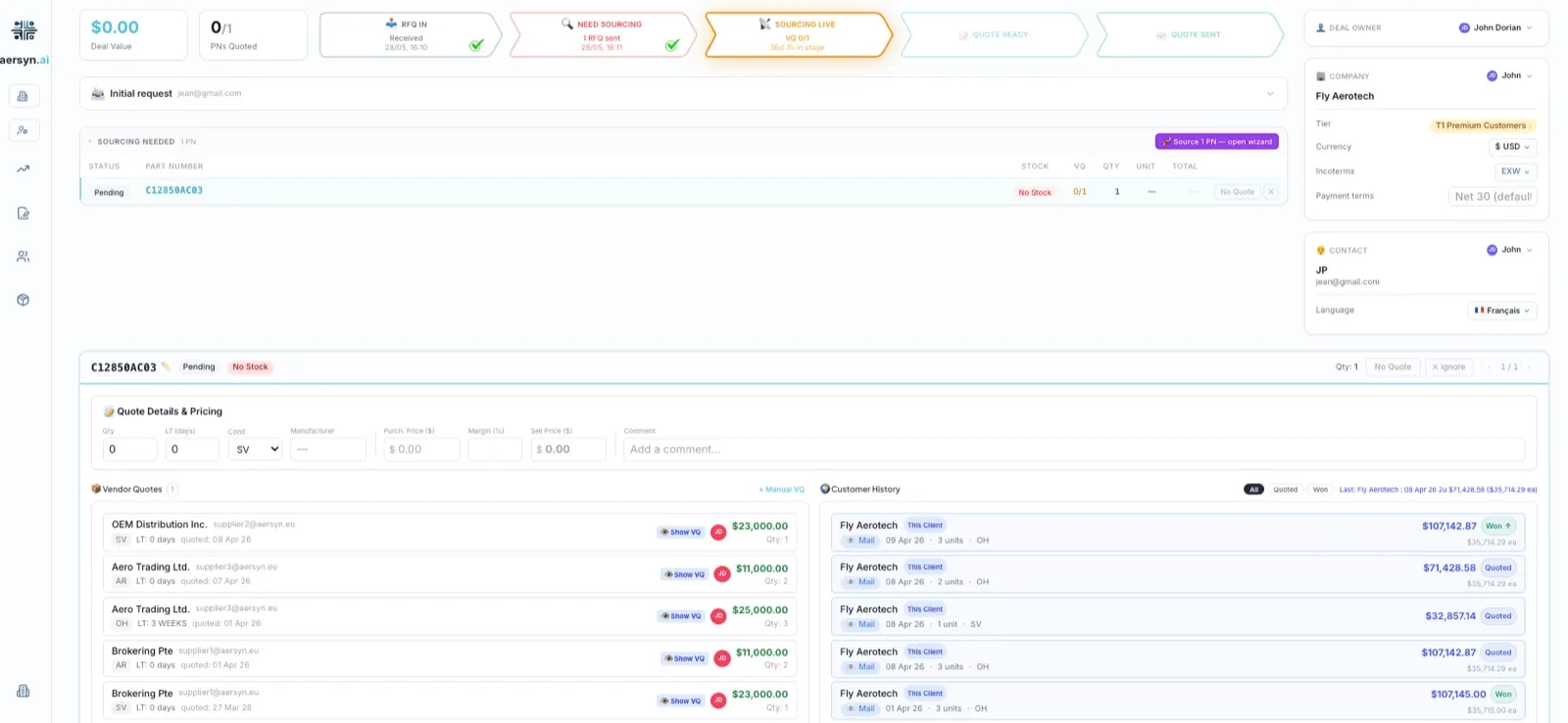
Vendor quotes come back and smart-match to the right RFQ on their own, so a reply that lands three days later still attaches to the correct deal instead of a lost thread.

A sourced part, C12850AC03, with five vendor quotes matched to the deal and compared side by side, $11,000 to $25,000 across conditions SV, AR, and OH, next to the client's own quote history.

Step 7 of 9

Every quote gets followed up, by design

Every quote you send enters a follow-up sequence, so a live deal never goes quiet because someone forgot to chase it.

The phone deal still closes on the phone. aersyn.ai logs it, preps the paperwork, and keeps the follow-up alive.

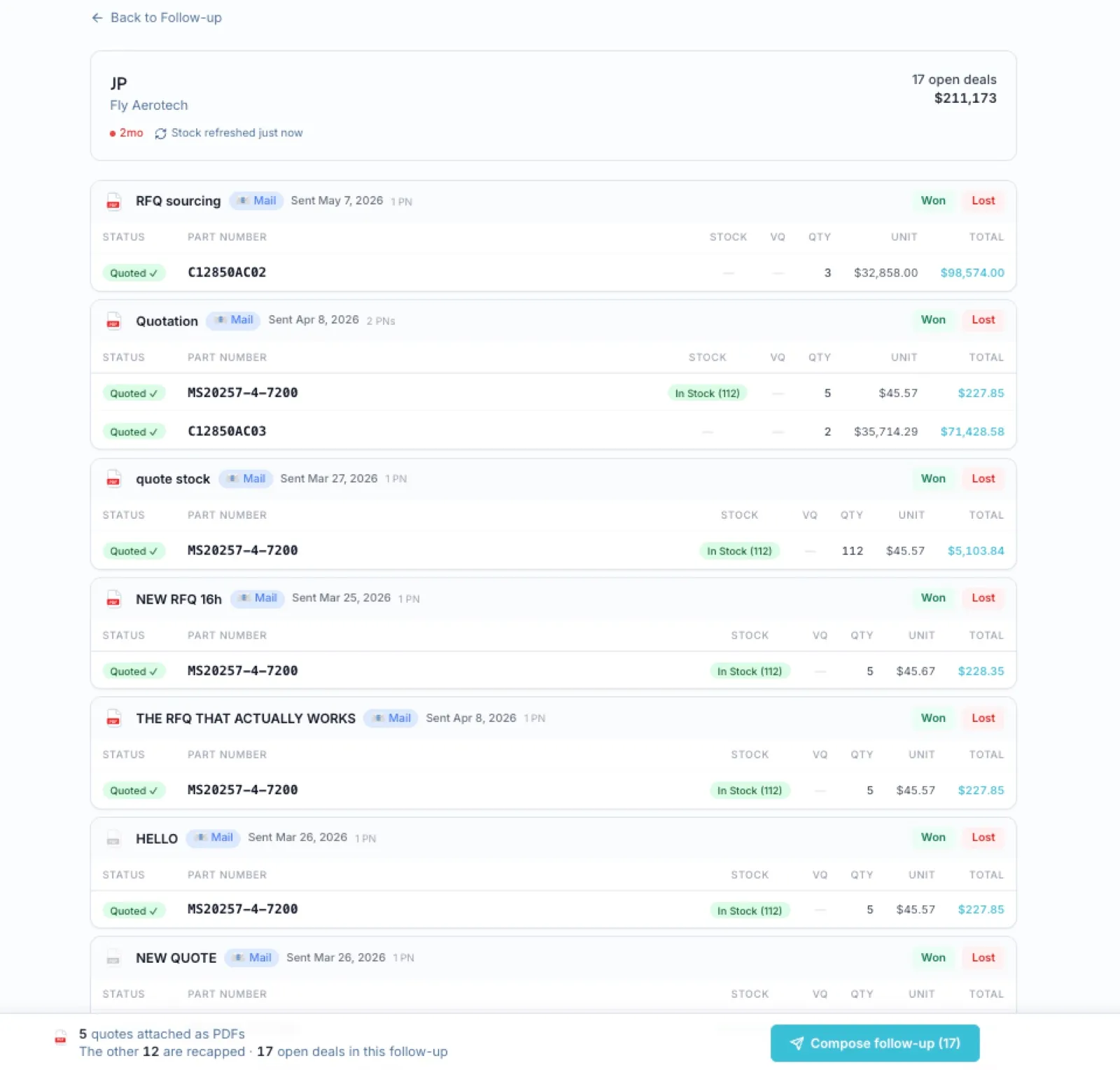
The follow-up workshop for one contact: 17 open deals worth $211,173, every quote recapped line by line with stock rechecked, five attached as PDFs, one Compose follow-up button for the lot.

Step 8 of 9

It catches price and quantity gaps before you ship

When the PO arrives, aersyn.ai reconciles it against your quote and flags any price or quantity gap before the parts ever leave the shelf.

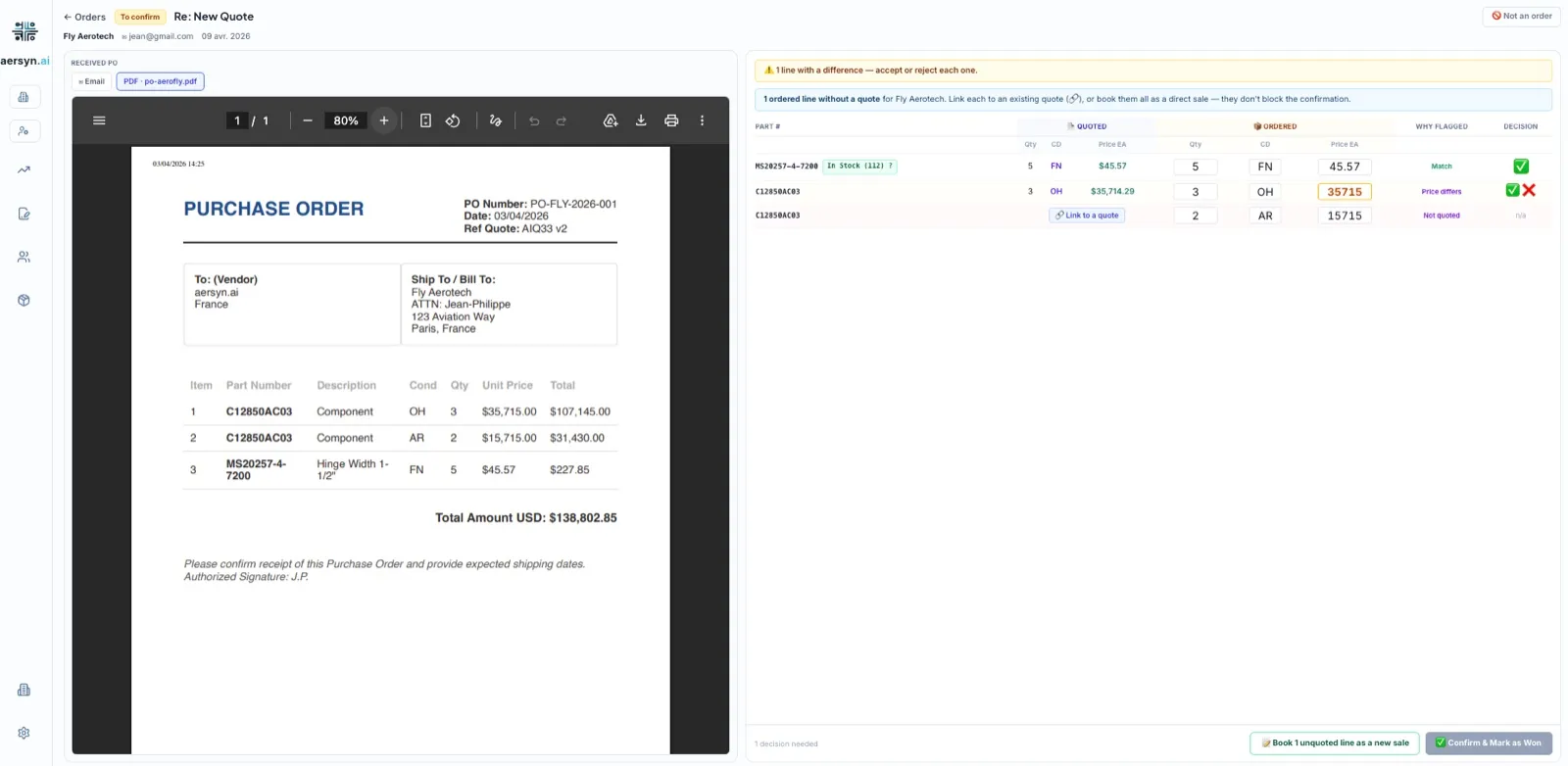
PO reconciliation: the received purchase order next to the quoted lines, MS20257-4-7200 matching at $45.57, one C12850AC03 line flagged because the price differs, one unquoted line waiting on a decision.

Step 9 of 9

The whole desk, on one dashboard

Open quotes, response times, win rate by client tier, and vendor performance, all on one dashboard, so you run the desk on numbers instead of gut feel.

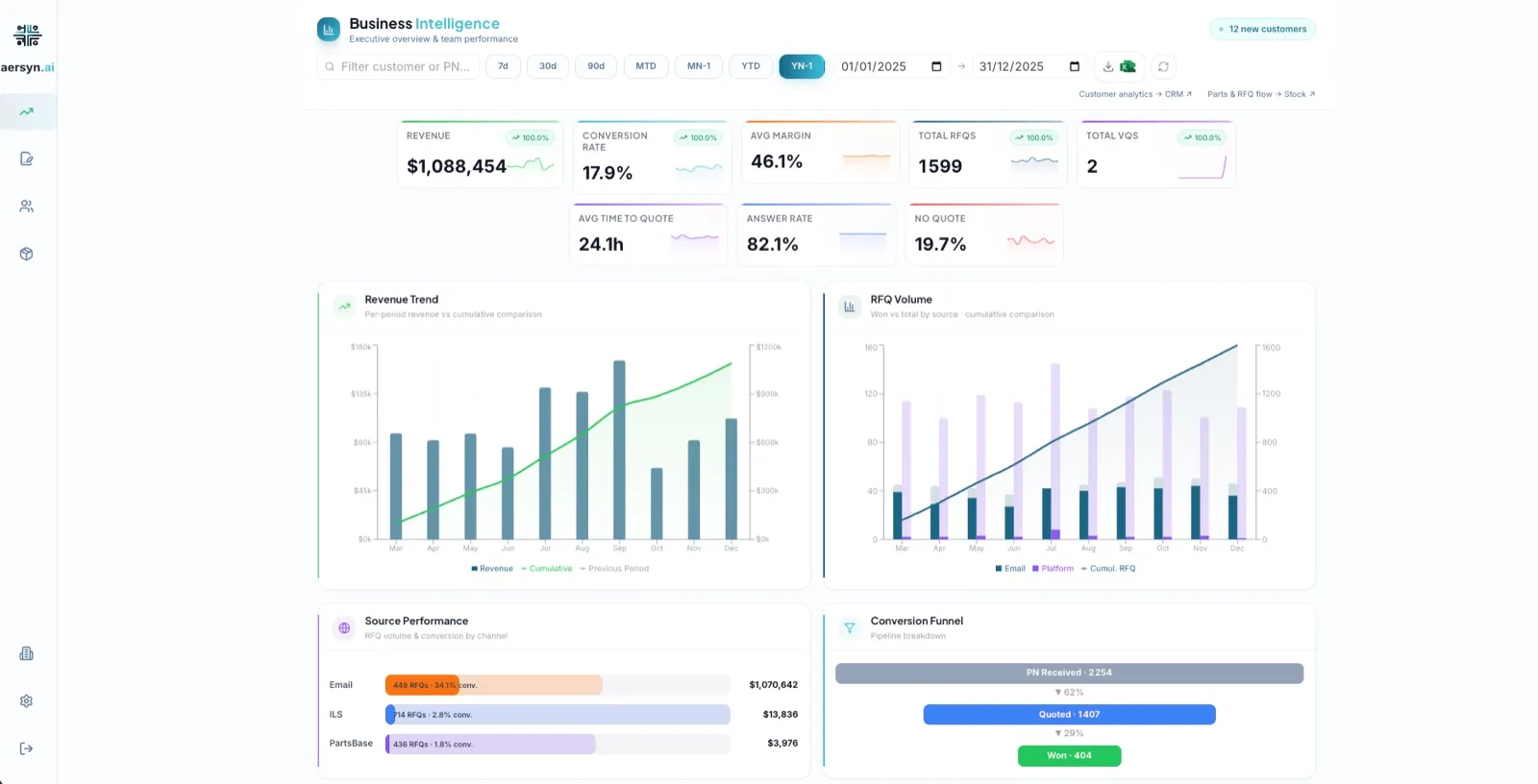
The executive dashboard: $1,088,454 revenue, 17.9% conversion rate, 46.1% average margin, 1,599 RFQs, 24.1h average time to quote, with revenue trend and source performance charts.

See it run in three minutes.

No signup, no sales call. Watch aersyn.ai take a live RFQ from the inbox to a ready-to-send quote, inside Outlook.

Human in the loop

Judgment stays human

Your trader still hits send, but they review a finished draft in seconds instead of spending six minutes rebuilding it from a scanned PDF. Judgment stays human, the typing disappears.

We haven't found another tool that does this

Two traders quote the same part to the same client. Two traders chase the same vendor for the same part. aersyn.ai catches both, before anything leaves the building.

Reliability

Nothing breaks in silence

When a parse fails, a connector drops, or a vendor never replies, aersyn.ai surfaces it in plain sight instead of swallowing it. You see the gap while you can still act on it, not after the deal is already lost.

Take the whole cycle to your team

Want something to forward to the traders who will actually use it? Here is the 1-page brief, the full cycle on a single sheet.

Get the 1-page brief to forward to your team

See your own trading cycle, inside Outlook.

Book a 20-min demo

Live in about two weeks.