
Insights
How do you reconcile a customer PO against the quote you sent?
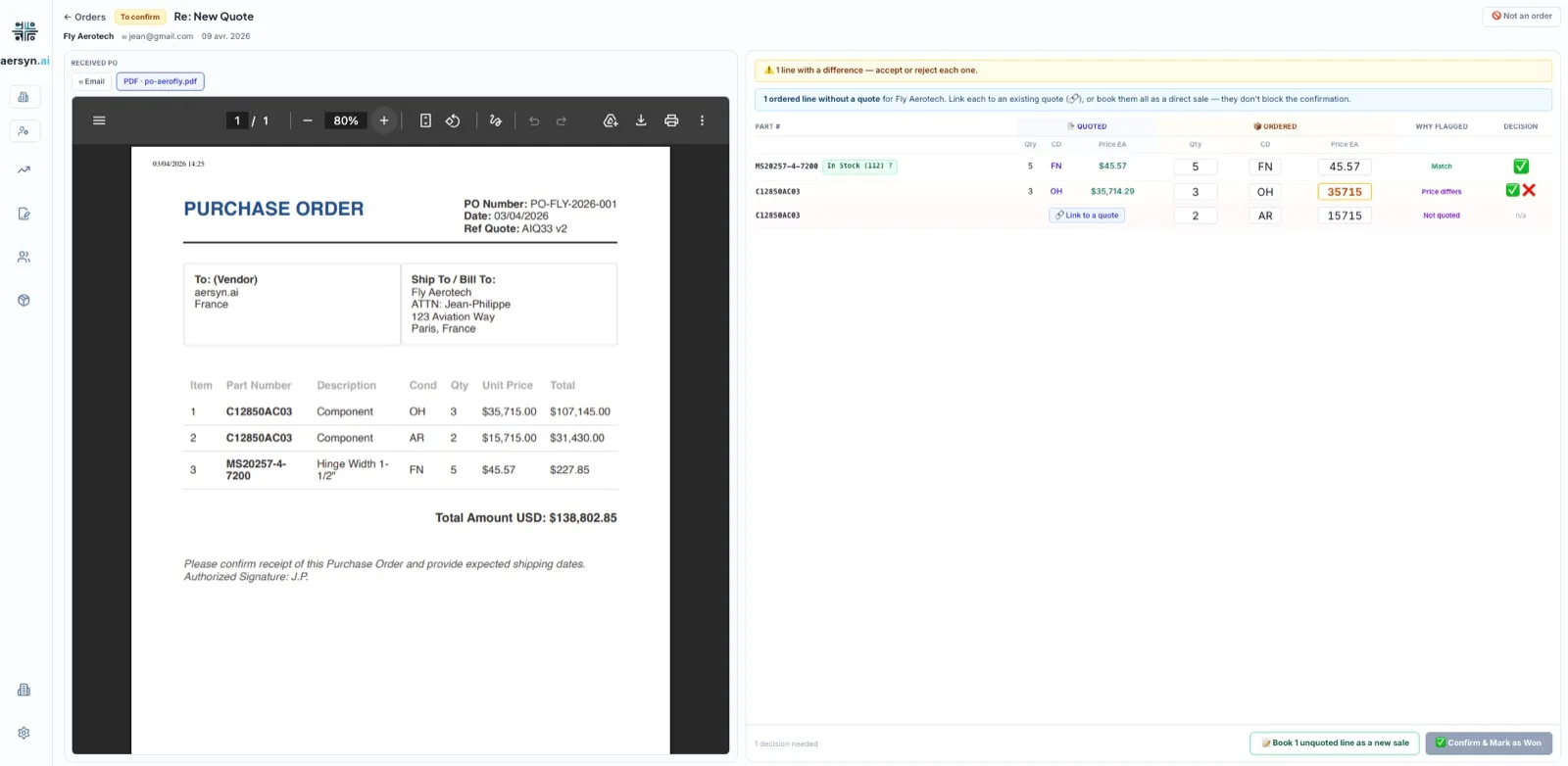
You reconcile a customer PO by putting it next to the quote you sent and comparing every line: part number, quantity, unit price and condition. Any line that differs gets decided by a person before the order is acknowledged and the part leaves the shelf. On a desk that answers fast, this is the check that slips first, because the PO lands after the quote and nobody has the original open.
What does PO reconciliation mean on a parts desk?
A purchase order (PO) is the buyer’s commitment to purchase at the terms you quoted. Reconciliation is the step that proves the commitment matches the offer. The RFQ said what the customer wanted, the quote said what you would sell and at what price and the PO says what they now want to buy. Three documents, one deal. The last one is the only one that obliges you to ship.
Why does a PO stop matching the quote?
Usually for ordinary reasons. That is what makes the gaps easy to miss.
- The customer orders a different quantity than the one you quoted.
- The price on the PO comes from an older quote, or from a number agreed on the phone that never reached the system.
- A line you never quoted has been added to the order.
- The part number is written another way, for instance as an alternate part number.
- The stock moved between the quote and the order.
Each of these costs money when it reaches the shelf unnoticed: a wrong price is margin you did not agree to, a wrong quantity is a part you do not have and an unquoted line is a commitment nobody priced.
What happens when the stock moves between the quote and the order?
I saw this at a customer after their quotes started going out faster. Orders came back from the platforms in larger numbers than before, which is good news. Some of them landed on parts that had been reserved in the meantime. The quote had left on stock that was available and by the time the order returned the part was promised elsewhere. Some orders had to be amended, a few cancelled.
The speed did not create that gap. It made it visible. The bottleneck moved from response time to the freshness of the stock data and the PO is the moment where the two meet: what you quoted, what the customer ordered and what is really on the shelf today. No tool can promise zero cancellations, because a part can still leave between two emails. What you can do is catch every mismatch at the PO instead of at the packing bench.
How do you check a PO without software?
Open the quote you sent beside the PO and walk the lines in order. For each one, compare the part number, the quantity, the unit price and the condition. Mark any line that has no match in the quote. Settle the gaps with the customer before you acknowledge the order and only then release the shipment and the trace paperwork.
It works and it takes real time on every order. The trouble starts when many POs arrive in the same week, because the check competes with everything else on the trader’s day.
How does aersyn.ai reconcile a PO?
When the PO arrives, aersyn.ai reads it and lays it beside the quoted lines. A line that matches is marked as matching. A line where the price or the quantity differs from the quote is flagged. A line nobody quoted waits for a decision. The trader reviews the screen, settles what needs settling and confirms the order, so the margin you quoted is the margin you book.
The check sits in the same flow as the rest of the cycle, from the RFQ to the PO, as the eighth step of the product tour. It follows the same rule as every other step: aersyn.ai prepares and your trader decides. That is the human-in-the-loop principle and the reasoning behind it is in why a human still hits send.
Where does the PO check fit in the cycle?
At the end of a flow that starts with the RFQ. The quote goes out priced from your stock and your rules, the follow-up keeps the deal alive and the PO closes it. If you want to see the whole chain, the product page walks through the nine steps and the pricing page explains how plans are structured.